
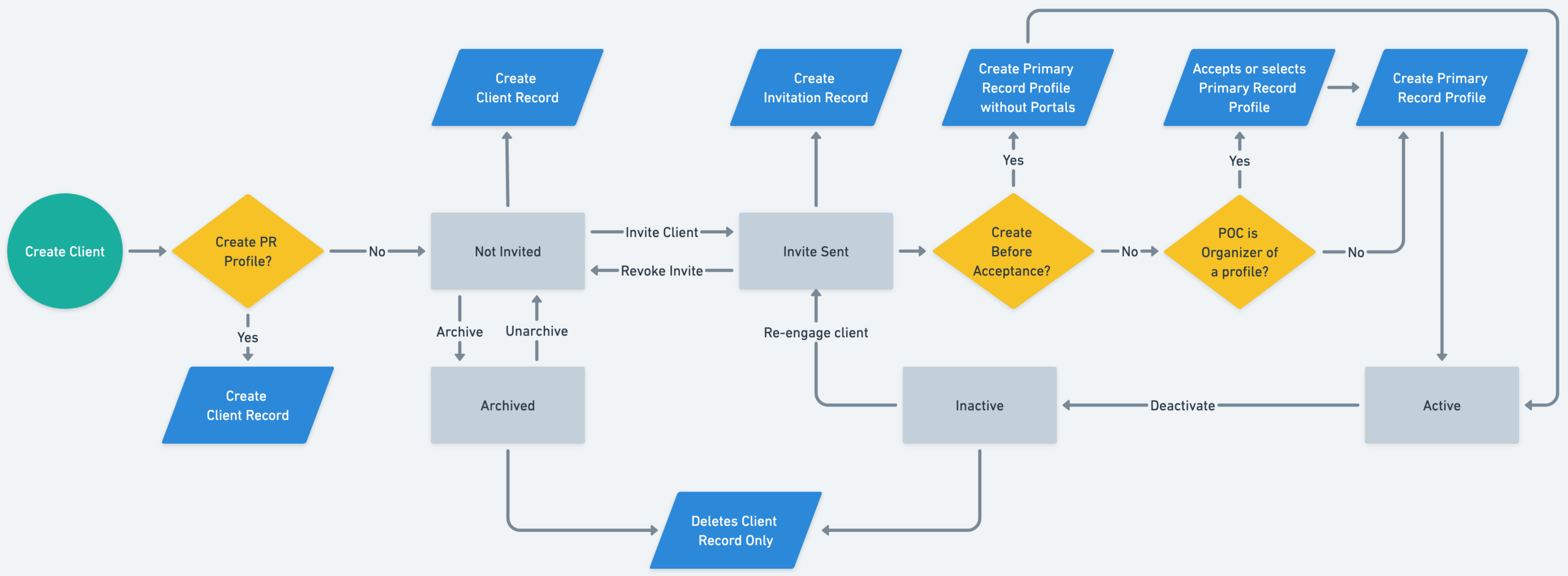
This guide outlines the full lifecycle of creating, inviting, activating, and managing a client within the Primary Record platform. It covers decision points, automation triggers, and manual actions from start to finish.
Step-by-Step Client Onboarding Process #
- Create a Client
- The process begins by creating a client record manually or via an automated intake system.
- Decide Whether to Create a Primary Record (PR) Profile
- If Yes: Proceed to Create Client Record.
- If No: The client is marked as Not Invited and no PR profile is created.
Not Invited State #
Clients who are not invited can remain in this state or:
- Be Archived (with the ability to Unarchive later).
- If re-engaged, can be moved forward by creating:
- A Client Record and
- An Invitation Record to initiate the invite process.
Sending the Invitation #
- Create Invitation Record
- This creates an Invite Sent state.
You now have two options:
- Revoke the invitation → reverts the client to Not Invited.
- Re-engage the client → can move them into the next stage.
Pre-Acceptance Record Creation #
- Create a Primary Record Profile Without Portals?
- Yes: The system will create a PR profile immediately without waiting for client interaction.
- No: Evaluate the next decision point.
Point of Contact (POC) Role Assessment #
- Is the POC the Organizer of a Profile?
- Yes: They are eligible to Accept or Select a PR Profile.
- No: The client remains Inactive until a new trigger or update.
Profile Activation #
- Acceptance or Selection of Profile
- Once the client:
- Accepts the invitation, or
- Is assigned a PR Profile,
- The system Creates the Primary Record Profile, and the client becomes Active.
- Once the client:
Client Status Management #
Clients may be transitioned between statuses:
- Deactivate → Moves from Active to Inactive.
- Delete Client Record Only → Removes client metadata while preserving Primary Record data.
Archived State #
Any Not Invited client can be:
- Unarchived to resume the workflow.
- Archived for inactivity, or
Summary of Key States #
| Status | Description |
|---|---|
| Not Invited | Client exists but has no invite or PR profile. |
| Invite Sent | Invitation created and sent to the client. |
| Inactive | Client did not accept or isn’t eligible for a profile. |
| Active | Client has a fully created and accepted PR profile. |
| Archived | Client is no longer engaged but can be restored. |
Tips #
- The “Create Before Acceptance” option is helpful when you need a profile for documentation before the client engages.
- Use the “Revoke Invite” option carefully—this removes client access entirely unless re-invited.
- Always confirm whether the POC is the rightful profile organizer to avoid confusion.